
My Odoo DB Is Growing Fast: What Can I Do?
Every Odoo instance grows in the same handful of places. A small toolchain covers most of them. One gap, age based archival per record type, still has no off the shelf answer.
This article is a five step playbook for Odoo technical leads and DevOps engineers running production instances between Odoo 16.0 and 19.0. We cover where the bytes actually live, what to delete, why deletion alone does not shrink the disk, how to move attachments out of the database, and the archival pattern that no module covers yet.
This is not a PostgreSQL tuning post. We do not touch shared_buffers, work_mem, or autovacuum thresholds. We touch Odoo configuration, OCA modules, and the small set of PostgreSQL commands that actually reclaim disk after Odoo deletes rows.
Step 1: Diagnose
Do not act on hunches. Run three queries and one shell command before installing anything.
Biggest tables, with TOAST and indexes split out:
SELECT c.relname,
       pg_size_pretty(pg_total_relation_size(c.oid)) AS total,
       pg_size_pretty(pg_relation_size(c.oid))       AS heap,
       pg_size_pretty(pg_total_relation_size(c.reltoastrelid)) AS toast,
       pg_size_pretty(pg_indexes_size(c.oid))        AS indexes
FROM pg_class c
WHERE c.relkind = 'r'
ORDER BY pg_total_relation_size(c.oid) DESC
LIMIT 20;
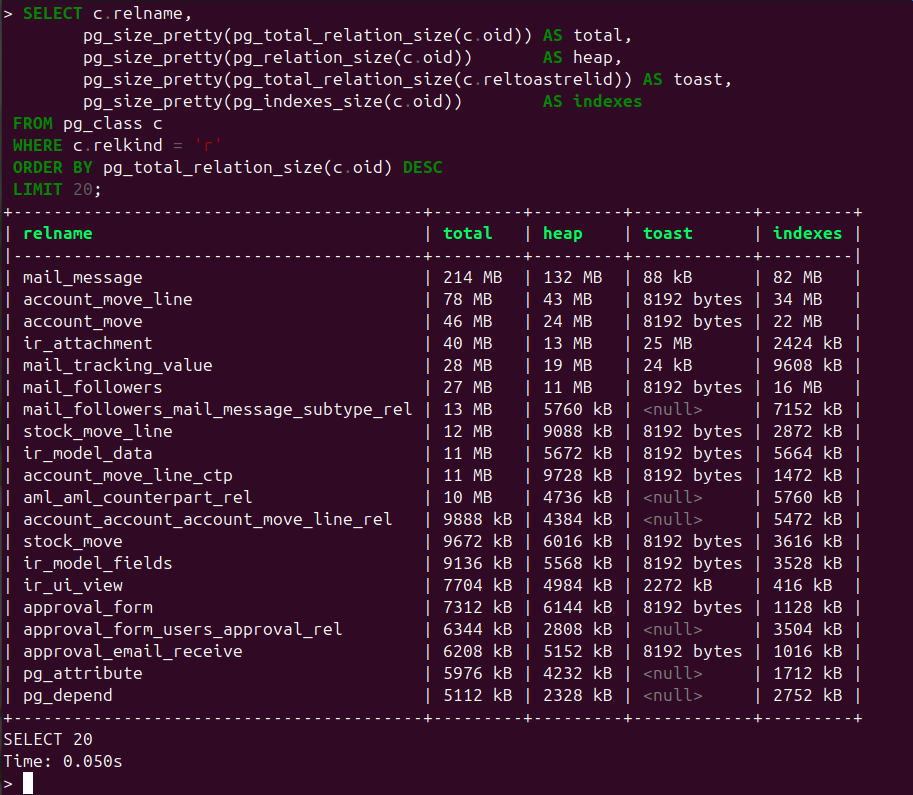
The toast column is usually the surprise. On a typical Odoo database, mail_message.body (HTML notification bodies) and ir_attachment.db_datas (when attachments are stored in the database) push gigabytes into the TOAST sidecar table that the basic pg_relation_size call hides.
Attachment storage mix:
SELECT type, COUNT(*), pg_size_pretty(SUM(file_size))
FROM ir_attachment
GROUP BY type;
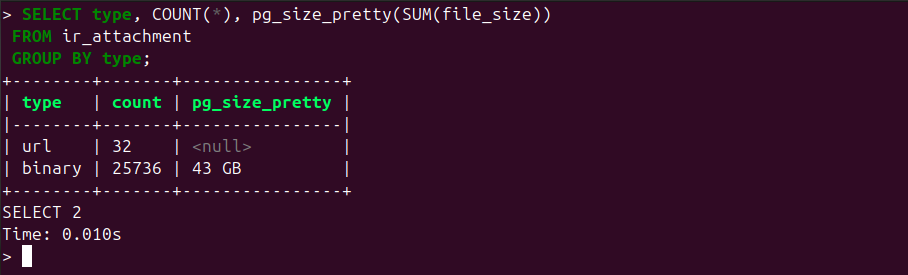
This shows whether bytes live in PostgreSQL (binary with db_datas populated), in the filestore, or already in cloud storage (cloud_storage type, available on Odoo 18.0 and later).
Chatter volume per model:
SELECT model, COUNT(*)
FROM mail_message
GROUP BY model
ORDER BY 2 DESC
LIMIT 20;
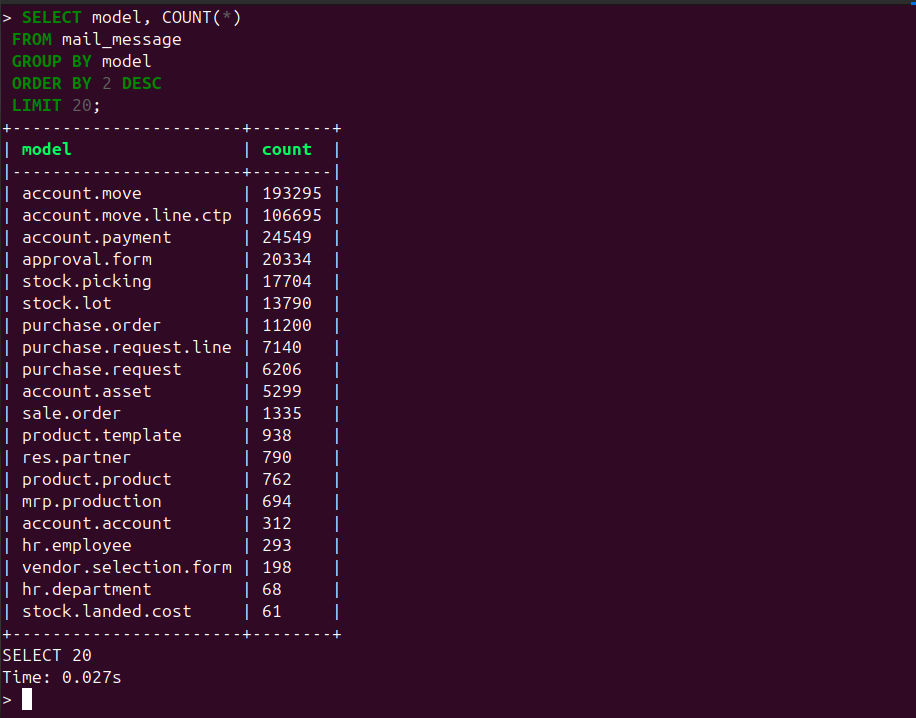
The top of that list (account.move, stock.picking, sale.order in most installs) tells you which model has the most aggressive notification trail.
Filestore disk: du -sh <data_dir>/filestore/<dbname>. Sample output on a mid sized production instance:
$ du -sh /var/lib/odoo/filestore/prod
42G     /var/lib/odoo/filestore/prod
Compare against the attachment storage mix query above. A large filestore is not bloat. A large filestore plus large ir_attachment.db_datas is.
If you run Trobz’s odoo-db CLI, three commands cover most of the above: odoo-db stats <db> for per table record counts and sizes with year over year growth, odoo-db bloat <db> for reclaimable table and index bloat (exact via pgstattuple when the extension is installed, plus dead tuple ratios, stale autovacuum, and unused indexes), and odoo-db attachments <db> for the attachment storage repartition with cleanup and archive candidates.
Now you know the offender. Fix order: clean, compact, externalize, archive.
Step 2: Clean
Start with what Odoo already gives you. The built in ir.attachment._gc_file_store() cron runs daily and removes filestore files whose ir.attachment row has been deleted, plus attachment rows pointing at non existent records (res_model plus res_id orphans). It does not delete mail.message or attachment rows by age. If your filestore disk dwarfs the matching ir_attachment totals from Step 1, check that this cron is enabled and not failing before installing anything else.
Beyond mail.message and ir.attachment, four more tables grow silently on busy instances. Check each one against your Step 1 top 20:
mail.notification(one row per recipient per message — multiplies with audit subscribers)mail.tracking.value(one row per tracked field change —account.moveandstock.pickingdominate)bus.bus(real time notification queue — has its own GC cron from 16.0; verify it is enabled)ir.logging(only whenlog_dbis set in the server INI; otherwise empty)
The OCA module covered next already cascades into mail.tracking.value and mail.followers. The other tables need their own scoped DELETE if they are bloating.
Most growth in mail.message is rows you will never look at again: status changes, automated notifications, tracking events. Delete them safely with OCA’s autovacuum_message_attachment.
The module ships two cron jobs (AutoVacuum Mails and Messages and AutoVacuum Attachments) and a rules table at Configuration, Technical, Email, Message And Attachment Vacuum Rules. Each message rule combines a model, a message type or subtype, and a retention in days. Each attachment rule combines a model, a name substring, and a retention. Deletion cascades to mail.tracking.value and mail.followers automatically.
Recommended cadence: daily, off peak. Start with conservative retentions (180 days on notifications, 365 on attachments) and tighten after a few cycles.
One gotcha: attachment rules match by name substring. A rule with substring report plus model account.move is fine. A rule with substring report alone will hit any attachment in your database whose name contains the word. Always co scope with model.
For inbound IMAP traffic, OCA mail_cleanup complements the above by marking, moving, or purging messages on the IMAP server before fetchmail ingests them into mail.message at all. Config sits in your server INI as cleanup_days, purge_days, and cleanup_folder. It only handles inbound mail, not internal chatter or notifications.
Version constraint to remember: both modules ship on OCA branches 14.0, 16.0, and 18.0. They do not ship on 15.0, 17.0, or 19.0 at time of writing. On those branches, either backport the module yourself or fall back to scripted SQL deletes scoped by model, subtype_id, and create_date.
Step 3: Compact
You delete a million rows. The disk does not shrink. This is PostgreSQL, not Odoo.
PostgreSQL pages are 8 kilobytes. Tuples cannot span pages, so when a row would exceed about 2 kilobytes PostgreSQL compresses its wide values and, if still too large, moves them out of line into a TOAST sidecar table (one per parent table). When you DELETE the parent row, the dead tuple in both the heap and the TOAST table is marked dead but not freed. Disk allocation stays put until something reclaims it.
Three reclamation paths, in order of operational cost:
pg_repack (pg_repack -t mail_message <db>) rebuilds the table online without taking an exclusive lock. Requires the pg_repack extension installed by a superuser. Production safe. On managed PostgreSQL services like AWS RDS or Aiven, check that the extension is available before relying on it. Sample run:
$ pg_repack -d odoo_prod -t mail_message
INFO: repacking table "public.mail_message"
NOTICE: Setting up workspaces
NOTICE: Copying tuples
NOTICE: Swapping tables
NOTICE: Dropping the old tables
VACUUM (FULL, VERBOSE, ANALYZE) mail_message rewrites the table in place. Takes an exclusive lock for the duration. Treat it as a scheduled outage proportional to table size: a 50 GB mail_message will lock for tens of minutes. Use on staging, or during a planned maintenance window. Sample output:
INFO:  vacuuming "public.mail_message"
INFO:  "mail_message": found 0 removable, 412903 nonremovable row versions in 28741 pages
DETAIL:  0 dead row versions cannot be removed yet.
CPU: user: 1.34 s, system: 0.48 s, elapsed: 18.27 s.
INFO:  analyzing "public.mail_message"
VACUUM
pg_dump -Fc | pg_restore into a fresh database writes every table linearly into a new database. Zero bloat on the destination. Heaviest downtime, but it is also the only way to reclaim space on managed services that block VACUUM FULL or pg_repack. Bundle it with the next major Odoo upgrade.
Pick by your downtime budget.
Step 4: Externalize
An ir.attachment always has a database row. The bytes can live in one of three places: a PostgreSQL bytea column (db_datas), the filestore directory (store_fname referencing a sha1 named file under <data_dir>/filestore/<dbname>/), or external cloud storage.
The choice is controlled by the system parameter ir_attachment.location (db or file, defaulting to file) plus, since Odoo 18.0, the cloud_storage add on suite.
@api.model
def _storage(self):
    return self.env['ir.config_parameter'].sudo().get_param('ir_attachment.location', 'file')
Critical gotcha: changing ir_attachment.location only affects new uploads. Existing rows stay where they are. If you flip from db to file expecting your db_datas bloat to disappear, nothing moves until you run the Force Storage admin action (Settings, Technical, Database Structure, Attachments, Action, Force Storage) or, on 18.0 and 19.0 with cloud storage, the cloud_storage_migration cron. Plan the migration job separately from the parameter flip.
The decision branches on Odoo version and target backend.
On Odoo 18.0 or 19.0, with Azure Blob or Google Cloud Storage: install the native modules cloud_storage plus either cloud_storage_azure or cloud_storage_google, optionally adding cloud_storage_migration to move existing files. New attachments take type='cloud_storage', and downloads are served as a signed redirect: Odoo signs a short lived URL, the client downloads directly from the cloud, and Odoo never streams the bytes itself. To migrate existing files, populate cloud_storage_migration_all_models and cloud_storage_migration_message_models system parameters with the models you want to offload, then trigger the Migrate Local Attachment Binaries to Cloud Storage cron. The cron iterates attachment by attachment, with the age floor baked into the query (simplified from cloud_storage_migration/models/ir_attachment.py):
query = SQL("""
    SELECT ia.id FROM ir_attachment ia
    WHERE ia.id <= %(max_attachment_id)s
      AND ia.type = 'binary'
      AND ia.store_fname IS NOT NULL
      AND ia.create_date < %(create_date)s
      -- plus filters on file_size, url, res_id, res_field,
      -- model scope, and documents.document linkage
    ORDER BY ia.id ASC LIMIT 1;
""",
    create_date=fields.Datetime.now() - timedelta(days=7),
)
That seven day floor is hardcoded. It is a safety rail, not a configurable retention.
On Odoo 16.0 or 17.0, or with any backend other than Azure or GCS (S3, MinIO, OVH, Wasabi, SFTP, WebDAV): install OCA fs_storage plus fs_attachment. The fs.storage model wraps the Python fsspec library and accepts any protocol fsspec exposes. fs_attachment extends ir.attachment to route bytes per model or per field through those backends, preserves the original filename (no opaque sha1 names), and integrates with X Sendfile so nginx serves blobs directly. The Force DB For Default Attachment Rules JSON keeps small images, JavaScript bundles, and CSS in PostgreSQL for performance: the default keeps any image under 50 kilobytes plus all assets in the database.
One trap to avoid: OCA also ships an older family (storage_backend, storage_file, attachment_s3) by the same authors. On Odoo 18.0 it still installs, but new projects should use fs_storage and fs_attachment. The legacy family is in bug fix mode only.
Backup callout: the db_datas column has attachment=False on the field definition. Odoo’s filestore backup tooling does not capture it. Only pg_dump does. If you are in db storage mode and your backup strategy assumes filestore plus a logical schema dump without binary, you have no backup of your blobs.
Step 5: Archive
Here is where every tool above stops short.
Real Odoo customers have retention requirements that span years. Accounting keeps invoices for the statutory window (often ten years), but the hot access window is one year. HR keeps payslips for five years, but most reads happen during the current year. Manufacturing keeps production reports for the regulatory window, but operations only touch them for the current quarter.
The pattern these customers want is straightforward: after N days or months, scoped per record type, move the attachment from hot storage to a cold tier, asynchronously, with retries, and rehydrate it lazily when somebody opens the document.
No module covers this today.
Native cloud_storage_migration comes closest, but it has three blockers. It supports only Azure and Google (no S3, no fsspec). Its age filter is a hardcoded seven day floor that protects recent files, not a configurable per model retention. It runs in a single cron worker with no queue_job retry semantics.
OCA fs_attachment has no age policy at all. It routes new attachments by model or field, but the routing is static.
Quick Reference
The full version matrix in plain form, so you can grep your cell:
Diagnose: SQL queries on Odoo 16.0, 17.0, 18.0, 19.0. No tooling difference.
Clean in database: OCA autovacuum_message_attachment on 14.0, 16.0, and 18.0. No module on 15.0, 17.0, or 19.0; backport or run scoped SQL.
Clean inbound IMAP: OCA mail_cleanup on the same branches as above. Same 15.0, 17.0, and 19.0 gap.
Compact: pg_repack or VACUUM FULL or pg_dump restore. All Odoo versions, your call by downtime budget.
Externalize new attachments to Azure or GCS: native cloud_storage on 18.0 and 19.0. Not available on 16.0 or 17.0.
Externalize new attachments to S3, MinIO, OVH, SFTP, WebDAV, others: OCA fs_storage plus fs_attachment on 16.0, 17.0, and 18.0. 19.0 port not published at time of writing; check OCA storage repo before relying on it.
Migrate existing attachments, one shot, no filter: native force_storage() admin action on all versions.
Migrate existing attachments to Azure or GCS, per model with batch limit: cloud_storage_migration cron on 18.0 and 19.0, with the seven day floor described above.
Conclusion
Measure first, fix in order (clean, then compact, then externalize), then pick your tool by Odoo version times backend. If your use case is age based archival per record type, contact us, we’re working on an attachment_archive_policy module that is not public yet but that might match your needs.